WITH · COMPLEMENTARY DEVICES
Samsung Sleep Apnea Alert: Add Sound Context
Samsung Health Monitor uses supported Galaxy Watch sensor data to look for signs of moderate to severe obstructive sleep apnea. Follow the device guidance and discuss concerns with a clinician. SomniSense adds a separate acoustic record with candidate timing, waveform and playback. It neither imports Samsung results nor checks whether the watch or a clinical test is correct.
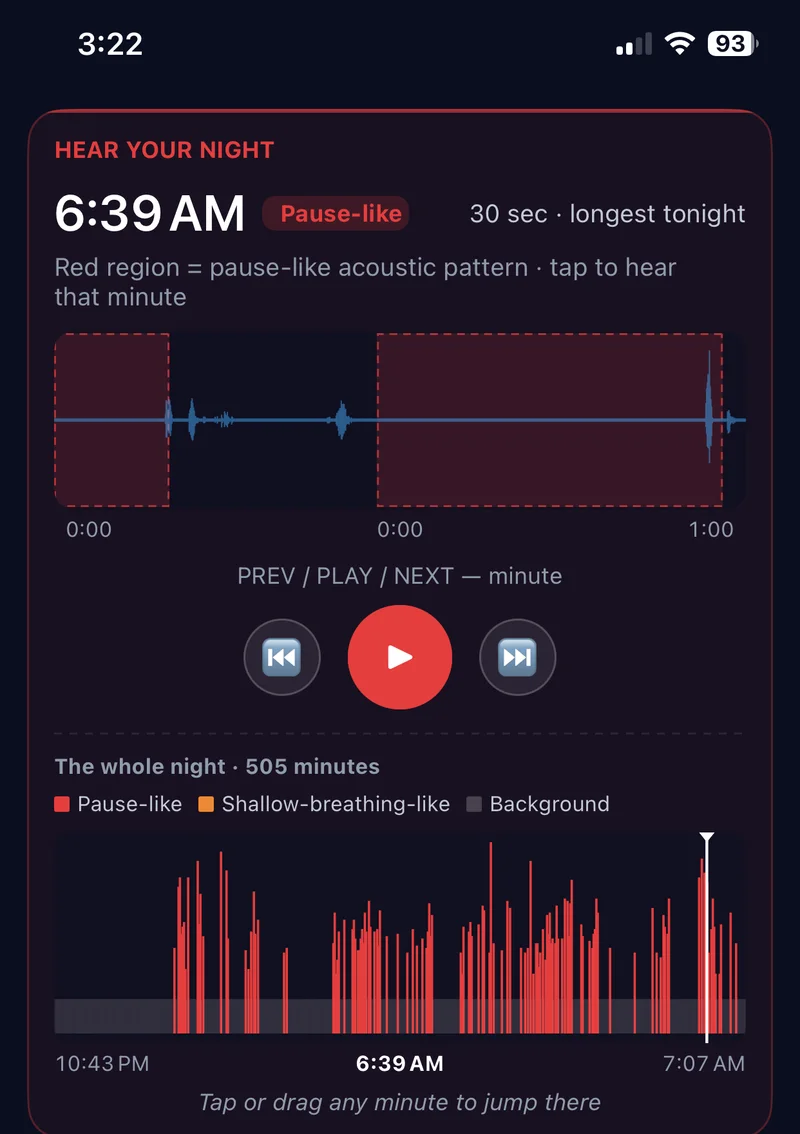
If your Galaxy Watch flagged signs of sleep apnea, follow Samsung's guidance and speak with a qualified clinician. The phone can add whole-night acoustic context, model-estimated candidate regions, and available local audio. It cannot turn a consumer-device comparison into a diagnosis.
What Samsung's sleep apnea feature actually does
Samsung documents a regulated sleep-apnea screening workflow for supported devices and eligible users. Availability, sensors, setup, age, region, software, and the exact interpretation can change, so the current Samsung Health Monitor instructions are the authority.
A notification is a reason to follow Samsung's clinical guidance. It is not something SomniSense can confirm or dismiss.
- Use the documented eligibility and setup for your specific device, software, and region.
- Keep the regulated screening scope separate from SomniSense's wellness scope.
- Follow Samsung's clinical next step if the feature produces a notification.
Nothing on this page is a reason to second-guess or delay that guidance.
What SomniSense adds — and what it honestly can't
Start with what we can't do: SomniSense doesn't measure blood oxygen. Supported Galaxy Watch features use wrist-sensor data under Samsung's stated requirements; a microphone on the nightstand cannot reproduce or validate that output.
Samsung Health also supports phone-based snore recording with compatible setups; that is separate from the Galaxy Watch sleep-apnea screening feature. See Samsung’s sleep and snore-recording guidance for requirements. SomniSense provides an independent bedside recording organized around candidate breathing moments, rather than verifying either Samsung output.
The first is time. SomniSense can keep a separate acoustic record on each night you choose to run it. A longer record does not confirm the watch result, measure progression, or establish whether a tagged factor caused a change.
The second is acoustic context. Where local audio is available, you can inspect what the microphone captured around selected model-estimated candidate regions. That audio does not tell you what the Watch was pointing at or prove that breathing stopped.
- Selected local audio playback — inspect what the microphone captured around candidate events.
- A product-defined BRI trend — candidate acoustic patterns per estimated sleep hour, not clinical AHI.
- Lifestyle Lab™ — compare nights with and without tags as an observational association.
- A structured wellness PDF — a shareable summary of multiple nights. Structured PDF reports are currently available in English only. The seven-language website does not change the report language.
Two different product scopes
| What you want to know | Galaxy Watch | SomniSense |
|---|---|---|
| Blood-oxygen-related view | See Samsung's supported feature and requirements | Not measured |
| Regulated screening question | See Samsung's current supported use | Not provided |
| Longer-period context | See available Samsung views | Separate nightly acoustic trend |
| What did the room microphone capture? | Compatible Samsung Health setups support phone-based snore recording; check requirements | Available audio around selected candidate regions |
| Compare nights with different tags | See available Samsung views | Observational Lifestyle Lab™ groups |
| Shareable record | Screen result | Nightly BRI + structured wellness PDF Structured PDF reports are currently available in English only. The seven-language website does not change the report language. |
| Do I need to wear anything? | The watch, charged, overnight | No — just the phone on the nightstand |
If the Galaxy Watch flagged you, here's the order I'd go in
First, follow Samsung's instructions. Use the notification and its shareable information as Samsung directs, including professional follow-up.
Then, while you wait for the appointment, SomniSense can add a separate microphone-based record across several nights. BRI is not the clinical AHI your doctor uses, and it cannot confirm or dismiss the watch result.
This is not Samsung versus SomniSense. One has a documented screening scope; the other is an optional acoustic wellness record.
Free keeps core first-night evidence, local playback within the app limits, and a recent 7-day trend · Pro adds longer continuity and fuller comparisons and reports.
Read next
Common questions
- Samsung's watch already told me I have signs of sleep apnea — why add SomniSense?
- Take the Samsung result seriously and follow its clinical guidance. SomniSense can add a separate multi-night acoustic record with candidate regions and available local audio, but it cannot confirm, dismiss, or explain the Watch result.
- Is SomniSense more accurate than the Galaxy Watch's blood oxygen reading?
- That is not a valid head-to-head comparison. They observe different signals and produce different outputs. SomniSense does not measure blood oxygen, and its BRI is not clinical AHI.
- Samsung's feature has a regulated screening use. Is SomniSense equivalent?
- No. Eligibility, supported devices, regions, software, and regulated wording belong to Samsung's current documentation. SomniSense is a consumer wellness product and is not FDA-cleared to diagnose or screen for sleep apnea.
- Can SomniSense run on additional nights?
- You can choose ordinary nights to record with a supported phone. Repetition creates a longer acoustic record; it does not confirm a watch result or measure clinical progression.