WITH · APPLE WATCH
Keep your Apple Watch. Check your sleep breathing with your phone.
SomniSense, a sleep apnea detector app, independently analyzes your breathing sounds for possible pauses and shallow-breathing patterns, then marks the moments you can see and hear. Start with a compatible phone you already own and a free first complete breathing report.
You do not have to choose between your Watch and your phone. Keep the wearable information you find useful, and use SomniSense to answer a more specific question in the morning: where did my breathing sound change, and what can I check for myself? If no valid report forms, you can try again for free.
WHAT SOMNISENSE ADDS
Go straight to a breathing moment you can check
Instead of searching through hours of sound, open a marked moment in your Night Report. See its estimated type, time and duration, follow the waveform, and hear the available sound before and after it. You can save an available minute of audio to keep your own copy.
- Candidate pause-like or shallow-breathing-like type, time, and model-estimated duration
- The marked waveform and playback of the sounds before and after the candidate interval
- Whole-night position, followed across nights in recent comparisons and structured reports
A mark is an acoustic model estimate, not a clinical diagnosis.
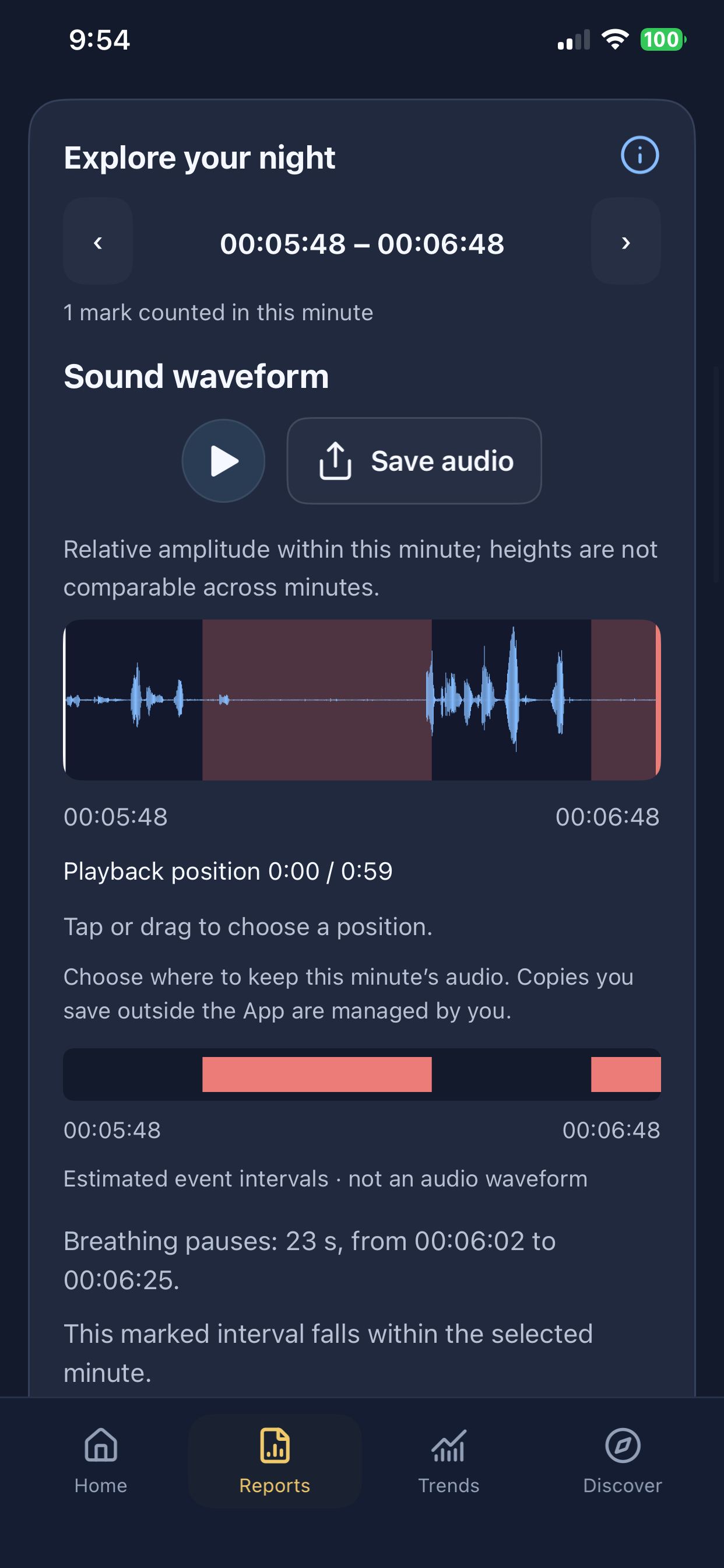
iPhone · version 1.2.0 interface example. Example recordings; your observations will differ.
One person, three nights, a pattern worth following
Our founder recorded the same three nights with an Apple Watch, an iPhone 14 and a Pixel 7. Each night’s Watch and phone readings were in a similar range. All three rose on the second night and fell on the third. That is a concrete reason to keep observing your own nights with an independent phone analysis.
| Night | Apple Watch Breathing Disturbances | iPhone 14 BRI | Pixel 7 BRI |
|---|---|---|---|
| Oct 27–28 | 26.28 | 22.1 | 20.7 |
| Oct 28–29 | 32.07 | 30.3 | 36.6 |
| Oct 29–30 | 26.06 | 20.7 | 27.8* |
*The Pixel’s third recording ended when its battery ran out at about 6:45 a.m., around 27 minutes before the other two records ended. The app marks it interrupted and excludes it from night-to-night comparisons; 27.8 is a partial-record value.
Apple Watch uses wrist movement for Breathing Disturbances; SomniSense analyzes phone audio for BRI. The values keep their own names and meaning. Read the complete account and original records for the three nights.
These are one person’s three nights, using different metrics and recording coverage. They show a useful cross-device pattern, not clinical accuracy or confirmation of an Apple Watch notification.
The numbers point to a night. The waveform gives you a place to look.
In this real Pixel recording, the app marks a 15-second shallow-breathing candidate at 01:48:34–01:48:49. Clear sound peaks sit before a quieter marked stretch, and sound rises again on the right. You can use the same review path on your own report to hear the available context and keep an available minute for later.
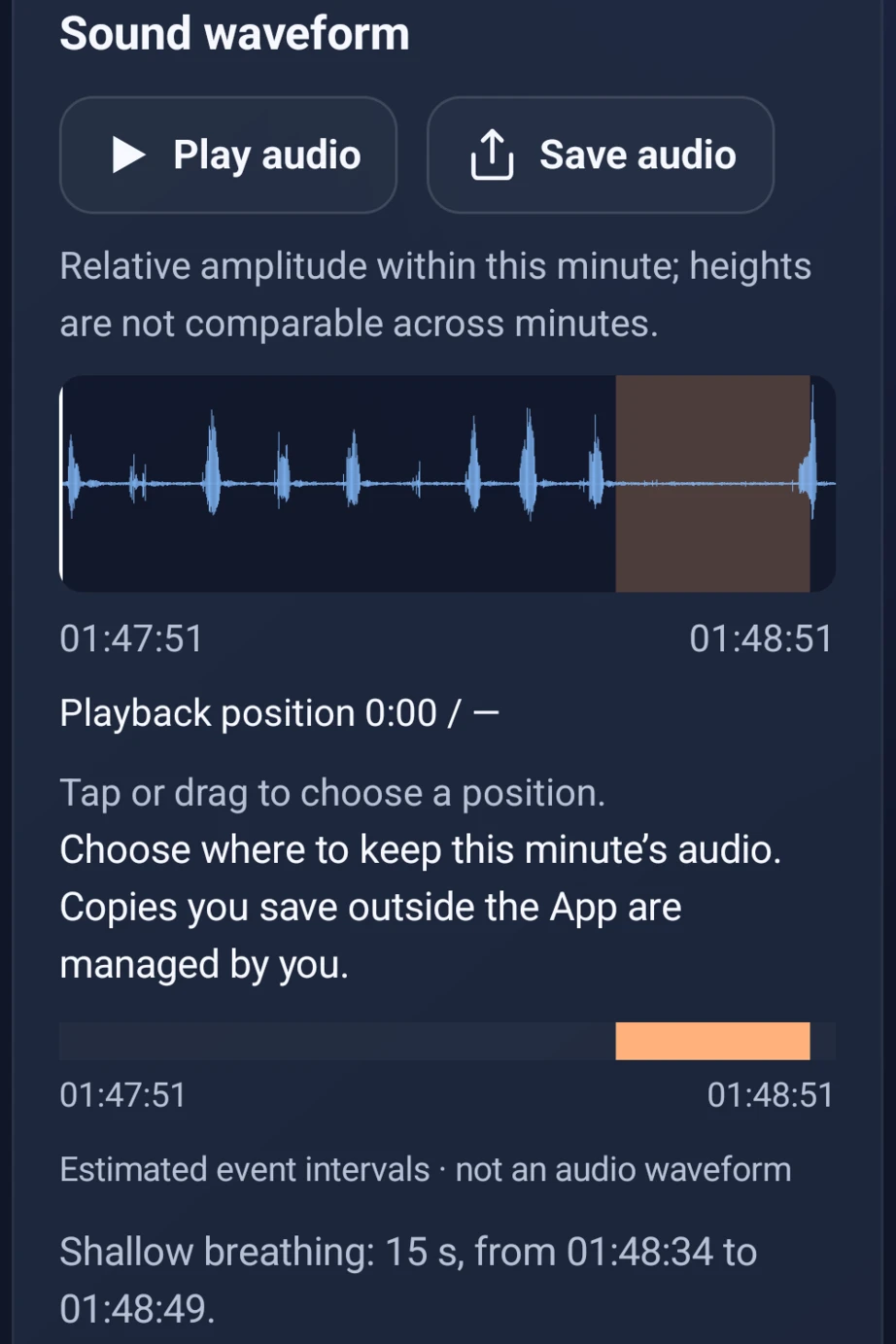
A mark is an acoustic model estimate, not proof that airflow stopped.
A phone-based method with published research behind it
Our own audio algorithms were studied using recordings paired with labels from clinical sleep studies (polysomnography, or PSG). The research describes 80 person-nights from 40 participants. One published compressed-model evaluation achieved 88.49% accuracy when classifying labeled 200-second breathing windows.
That is a research-window result, not the accuracy of every app event, BRI value or personal recording. You can read the methods and task results on our research and evidence pages.
Keep the Watch information you already value
Apple Watch offers sleep and wearable trends, with features depending on the device, software and region. Its supported sleep apnea notification feature uses the accelerometer to assess breathing disturbances over 30 days. SomniSense runs independently on your phone; it does not import or synchronize Watch or Apple Health data. Compare dates and recording coverage manually.
Choose the next step that fits your question
My Watch sent a notification
Open the Health report and arrange a conversation with a qualified clinician.
Understand the notification and next stepsI have symptoms, with or without a notification
Witnessed pauses, gasping or persistent daytime sleepiness deserve clinical discussion.
Find the next step for your symptomsI want to inspect my own breathing record
Start with one ordinary night, then open a marked moment the next morning. Continue across nights if the record is useful to you.
Start my free breathing reportI am already diagnosed or receiving treatment
Keep your clinician’s plan and prescribed equipment. A phone record can supplement your own observations; it does not replace clinical monitoring.
How phone observations fit beside CPAPUse the phone you already have tonight
No other monitor to buy or wear. Place your compatible phone as the app guides you, then begin your recording. In the morning, start with your own complete report before deciding whether you need more.
Your first complete breathing report is free to view—and stays free to revisit.
No valid report yet? You can try again for free.
Start my free breathing reportRecording and analysis stay free. Pro unlocks later complete breathing reports; snoring stays free.
Already using SomniSense? Close this page and open a marked moment in your Night Report. More nights and context tags are optional.
Common questions
- Why add SomniSense if I already use Apple Watch?
- You get an independent phone analysis of possible pauses and shallow-breathing patterns, with a marked time, waveform and available sound you can inspect. Your first complete breathing report is free, so you can start with your own record rather than buying another wearable.
- Does it synchronize with Apple Watch or Apple Health?
- No. Use each app independently and compare the dates and recording coverage manually.
- Does SomniSense use my Watch battery?
- No. SomniSense runs on your phone, not on your Watch. Phone battery use varies by device, battery health, settings and recording duration; follow the app’s setup guidance.
- Can it confirm or dismiss a Watch sleep apnea notification?
- No. Keep the clinical follow-up recommended by Apple. The phone report is an additional wellness observation, not a verdict on the notification.