Phone-based signs you can review
SomniSense lets you begin with an existing phone and inspect breathing sounds across nights you choose. Its audio methods have been studied with recordings paired with clinical sleep-study annotations.
SomniSense · Sleep Apnea Detector
Do you know what signs of sleep apnea your phone can help you notice at home?
Do you know what you could see in your own results tomorrow morning?
Do you know whether those patterns repeat—or change across your nights?
SomniSense is a sleep apnea detector app that analyzes breathing sounds while you sleep. Use your existing compatible iPhone or Android phone beside your bed—no extra device to buy or wear. In the morning, review possible pauses and shallow-breathing patterns, how often they were marked and when, with available sound to check for yourself.
Your first complete report on breathing irregularities is free to view and revisit. If a recording does not qualify, you can try again free. Later complete reports require Pro; recording and analysis stay free.
01 · Your phone, your own bed
Want to look for sleep apnea signs across ordinary nights? SomniSense uses your phone’s microphone and its own on-device audio analysis to make breathing irregularities easier to notice and revisit.
Place your compatible phone on a stable, uncovered nightstand, leave the microphone unobstructed and follow the app’s setup guidance. Make sure it has enough battery for your recording; you do not need to keep it charging all night.
Your sleep audio is analyzed and stored on your phone. SomniSense does not upload raw sleep audio. You choose whether to export or share available sound.
See the bedside setup → · Questions about a partner, background noise or recording? →
02 · Your first morning
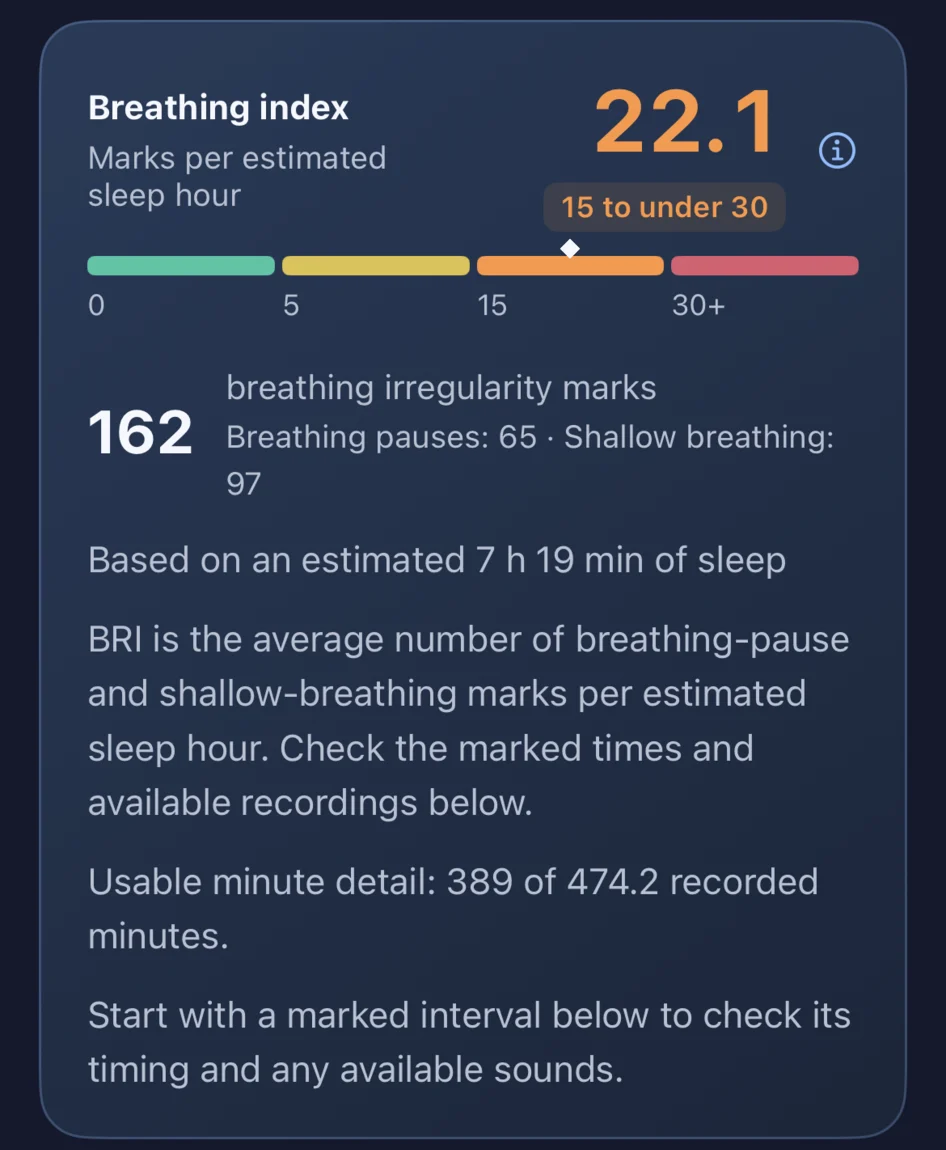
Find out how often breathing irregularities were detected in your night and when they appeared. Your Night Report shows the count and distribution; open a marked moment to check its waveform and available surrounding sound, without searching through hours of audio.
This is the founder’s real iPhone 14 report for October 27–28: 162 breathing-pattern marks and BRI 22.1. It shows the kind of result you can inspect, rather than an outcome promised for your night.
BRI summarizes marked patterns per estimated sleep hour. Your app groups possible breathing pauses and shallow-breathing patterns under Breathing irregularities.
Explore this real morning report →
See how a marked moment opens into sound →
03 · Beyond a single night
One night answers “what was marked last night?” More nights let you see whether the pattern repeats, which nights have more or fewer marks, and how a change fits your recent record.
With Pro, keep opening complete reports from later nights, explore longer trends and compare nights with a habit tag and nights without that tag when there are enough observations. A change in the record is something to investigate, not proof that a habit caused it.
Pro weekly and monthly PDFs bring available observations together in a readable summary you can save, revisit or choose to share. They are separate from your single-night app report; return to the app for available sound.
Explore your nights over time → · Compare your tagged nights →
SomniSense lets you begin with an existing phone and inspect breathing sounds across nights you choose. Its audio methods have been studied with recordings paired with clinical sleep-study annotations.
A home sleep apnea test (HSAT) uses medical sensors and professional interpretation. If you need diagnosis or treatment decisions, ask a clinician which clinical test is appropriate.
SomniSense is a wellness tool, not a medical device or a replacement for HSAT or PSG. Its sound-based results and BRI do not diagnose sleep apnea; no marked irregularities does not rule it out.
Download SomniSense, record tonight and explore your first complete report on breathing irregularities free. If the recording does not qualify, try again free. You can revisit that first complete report without Pro.
If you want complete reports from later nights and a longer view of your own patterns, choose Pro. Recording, analysis and the free snoring features remain available without it.